
Download LedgerFlow – accounting app, invoicing tool, business finance, small business accounting, financial management
Overview
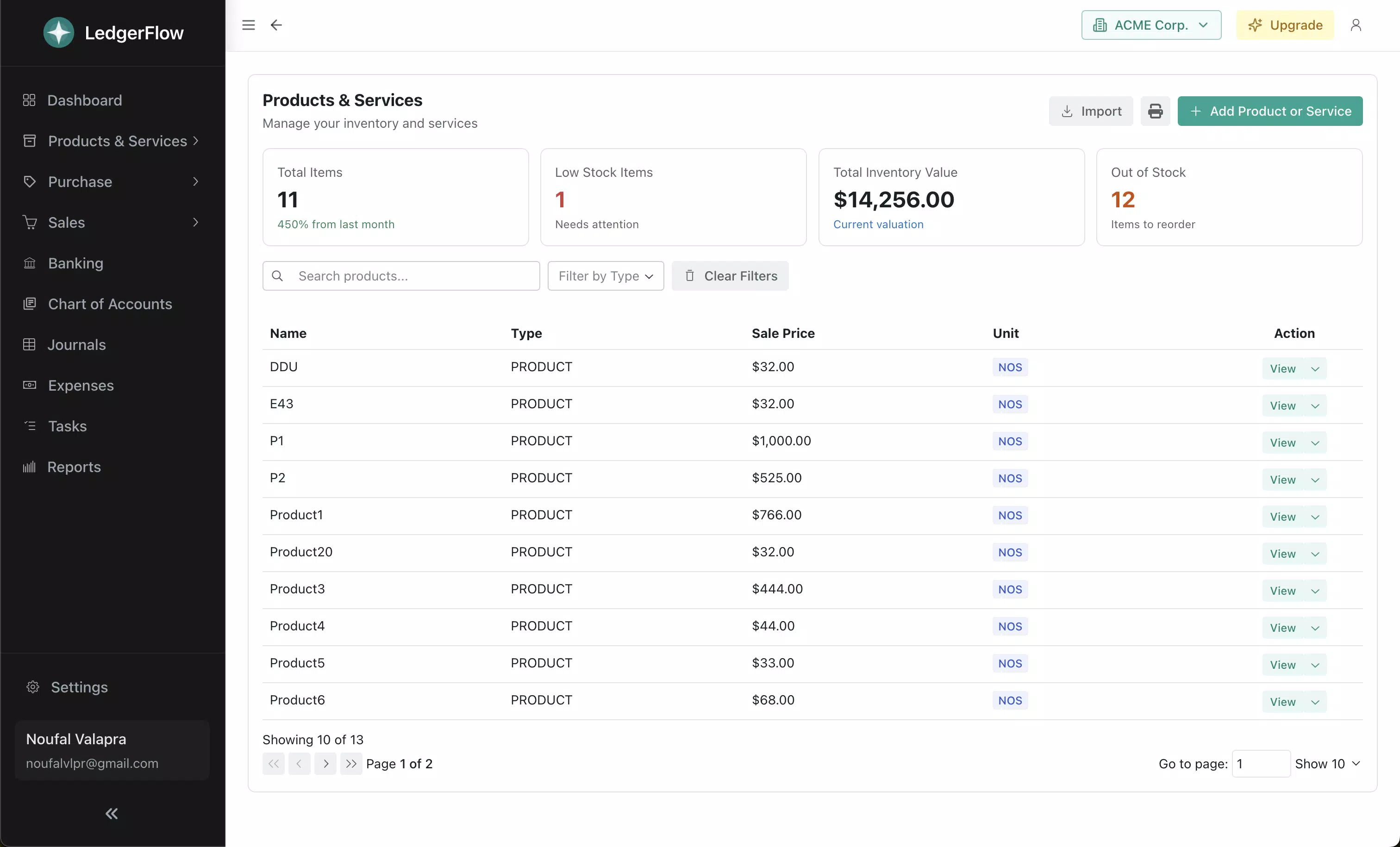
LedgerFlow is a mobile application designed to simplify business financial management for small business owners and entrepreneurs. By integrating core accounting functions with user-friendly design, it enables users to oversee key financial operations directly from their smartphones. The app addresses common pain points such as delayed invoicing, disorganized bookkeeping, and limited team access to financial data. Its primary purpose is to provide a centralized, accessible platform for managing cash flow, tracking sales, issuing invoices, and monitoring inventory—all essential for maintaining financial health in a dynamic business environment.
Target users include solo entrepreneurs, small business operators, freelancers, and teams managing multiple ventures. The app supports real-world use cases such as tracking client payments, generating professional invoices on the go, and reviewing financial performance through an intuitive dashboard. It also facilitates collaboration among team members, allowing business partners or accountants to access relevant data with assigned permissions. This makes LedgerFlow particularly valuable in environments where timely financial decisions are critical.
The developer, LedgerFlow, has positioned the app as a lightweight yet powerful tool for modern business operations. Although the developer did not provide additional technical details or background, the app’s feature set suggests a focus on usability and reliability. In the broader app ecosystem, LedgerFlow fills a niche by combining double-entry accounting with mobile accessibility, offering a practical alternative to complex desktop accounting software.
Key Features & Functionality
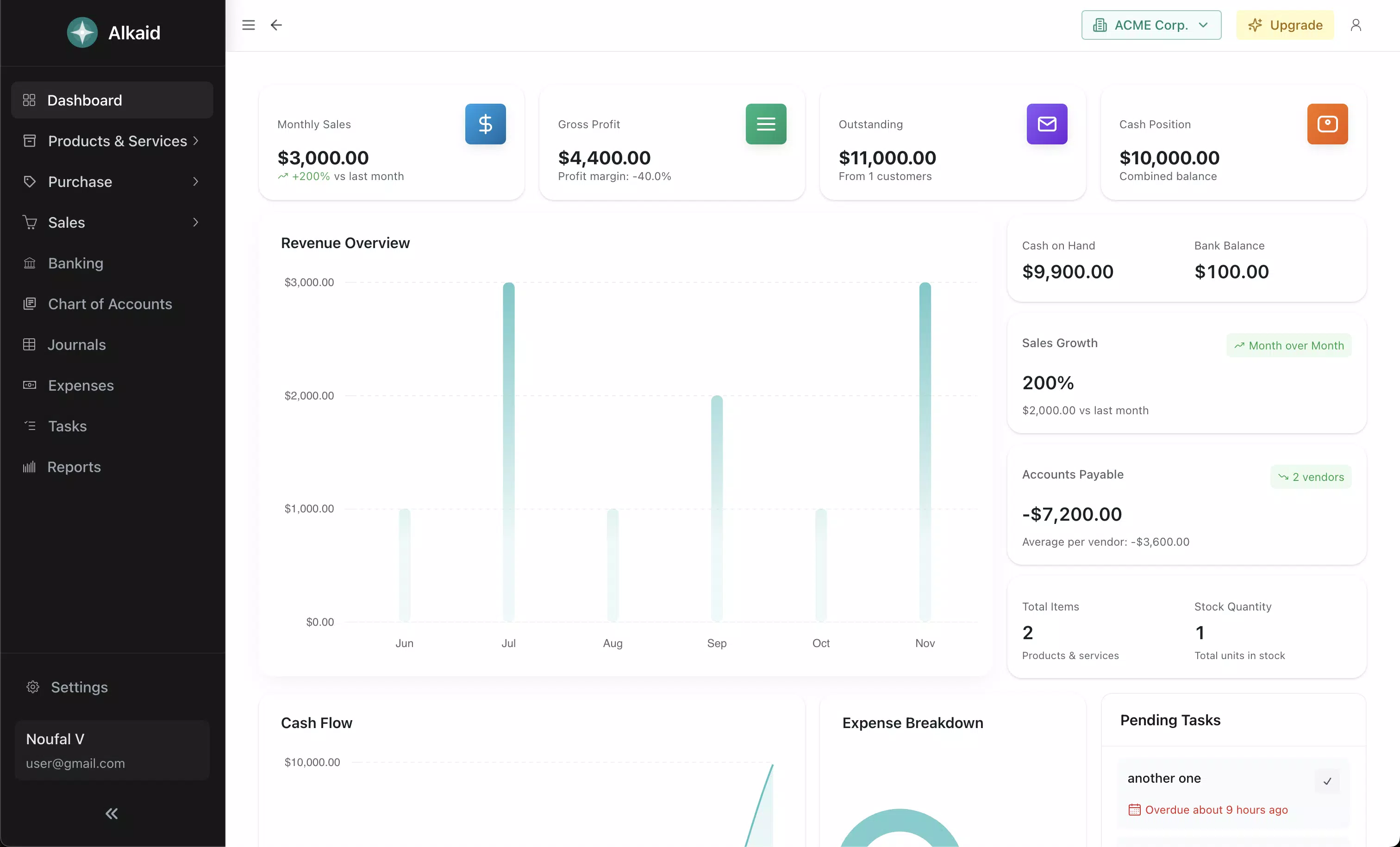
- Comprehensive Dashboard: The app delivers a consolidated view of essential business metrics, including cash flow, outstanding invoices, and sales performance. This real-time overview allows users to assess financial health at a glance, enabling proactive decision-making without navigating through multiple menus.
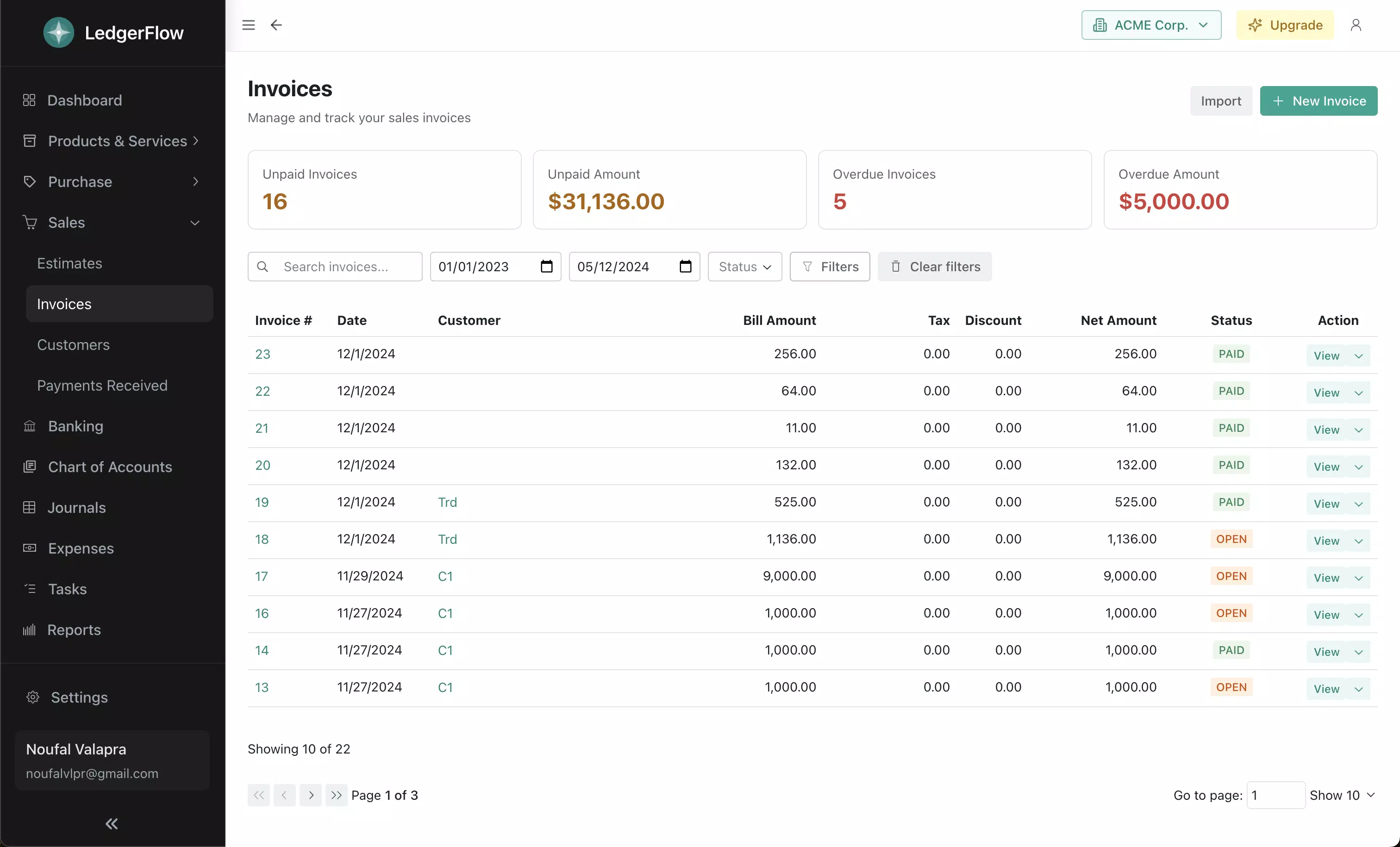
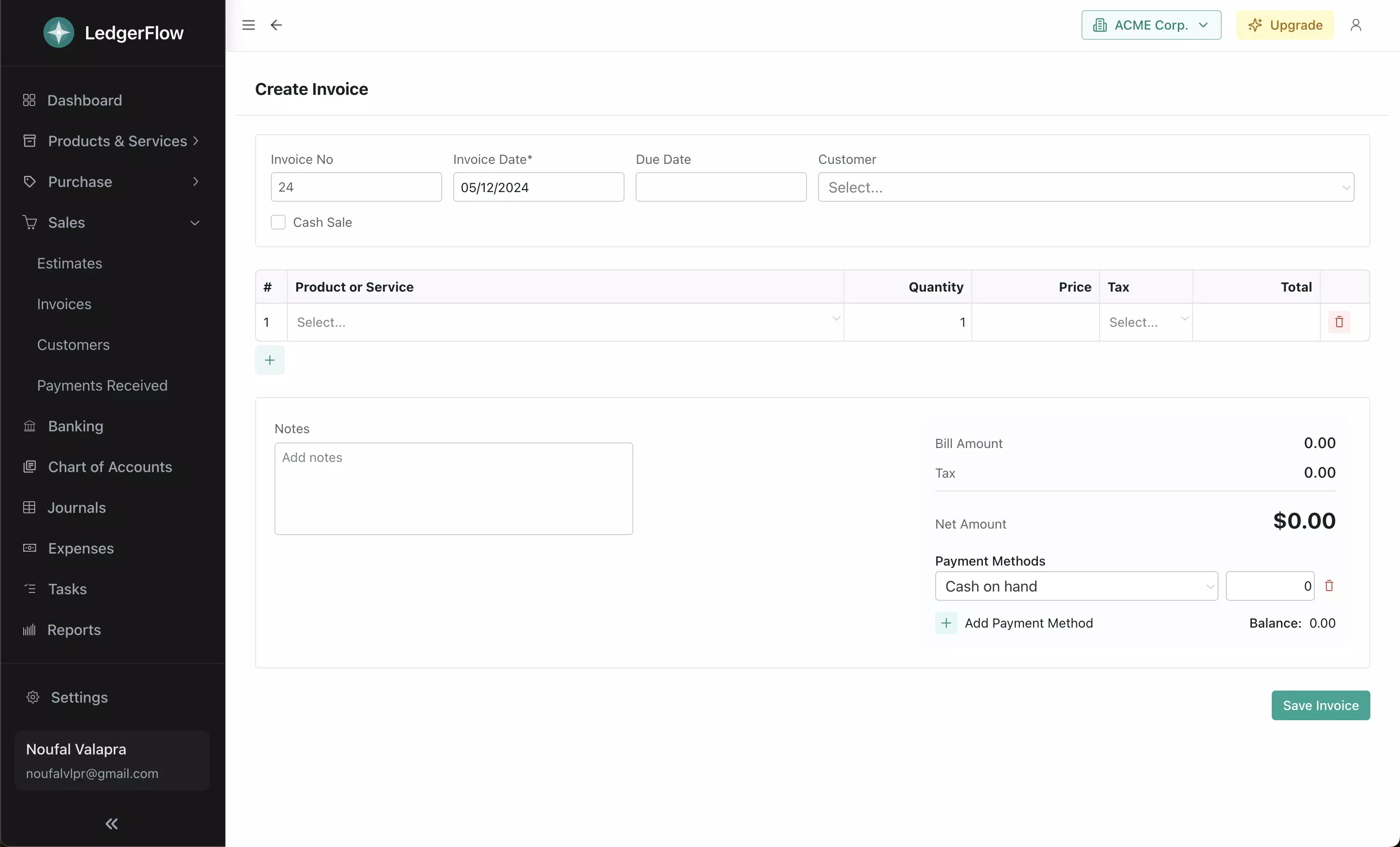
- Effortless Invoicing: Users can create and send professional invoices within seconds. The feature supports customizable templates, automatic due date tracking, and payment status monitoring, helping to reduce billing delays and improve cash flow consistency.
- Double-Entry Accounting: LedgerFlow implements double-entry bookkeeping principles, automatically balancing debits and credits. This ensures accurate financial records without requiring users to have formal accounting training, making bookkeeping more accessible and less error-prone.
- Real-Time Collaboration: Team members or business partners can be invited to join the app with role-specific permissions. This feature supports seamless coordination, especially useful when multiple stakeholders are involved in financial oversight or client management.
- Automatic Theme Switching: The app adapts to the device’s system theme, switching between light and dark modes automatically. This enhances readability and user comfort during extended use, particularly in low-light environments or outdoor settings.
These features are designed to support practical workflows, such as sending an invoice after a client meeting, reviewing monthly sales trends before a budget meeting, or assigning a team member to handle accounts payable. The integration of automation and real-time access makes LedgerFlow a valuable tool for maintaining financial discipline in fast-paced business environments.
Interface, UX & Performance
LedgerFlow presents a clean, intuitive interface that prioritizes ease of navigation and visual clarity. The layout is organized around a central dashboard, with clearly labeled sections for invoicing, reporting, and financial summaries. Navigation is streamlined, allowing users to move between key functions with minimal taps, reducing cognitive load and improving task efficiency.
Visual design emphasizes readability and accessibility. Charts and data displays are presented in a way that makes complex financial information easy to interpret. The automatic theme switching enhances usability across different lighting conditions, minimizing eye strain during prolonged sessions. While the developer did not list formal performance metrics, the app’s lightweight size of 25.4 MB suggests optimized resource usage, which typically correlates with faster load times and smoother operation.
Although the developer did not specify minimum OS requirements or detailed performance benchmarks, the app appears designed for efficient performance across a range of Android devices. Users can expect responsive interactions, consistent layout rendering, and stable operation during regular use. Stability is further supported by the app’s adherence to standard mobile development practices, including proper memory management and background task handling.
Platform Compatibility & Technical Requirements
LedgerFlow is available exclusively on the Android platform. The current version is 2.1.4, with a file size of 25.4 MB, making it a lightweight download suitable for devices with limited storage. The app is offered free of charge, with no in-app purchases or subscription tiers currently listed.
The developer did not specify minimum OS requirements or device compatibility details. As such, compatibility information was not fully disclosed. Users are advised to check the app’s official page or store listing for the latest compatibility updates. The app’s small size and free pricing suggest broad accessibility, especially for users seeking a no-cost solution without sacrificing core functionality.
Pros and Cons
Pros
- Free to download and use with no hidden costs.
- Lightweight design at only 25.4 MB, ideal for devices with limited storage.
- Intuitive dashboard provides immediate access to key financial metrics.
- Supports double-entry accounting for accurate, reliable bookkeeping.
- Real-time collaboration features enhance team-based financial management.
Cons
- Platform availability limited to Android only.
- Specific system requirements were not listed.
- Developer did not provide information on update frequency or long-term support.
- No details on cloud backup or data export options.
- Compatibility with older Android versions remains unspecified.
FAQ
Is LedgerFlow available for iOS devices?
As of the current release, LedgerFlow is only available on the Android platform. There is no official iOS version listed.
Can I use LedgerFlow without an internet connection?
The app requires an internet connection for full functionality, including syncing data, sending invoices, and accessing cloud-based reports. Offline capabilities were not specified.
Is my financial data secure in LedgerFlow?
LedgerFlow uses standard security practices to protect user data. However, specific details about encryption, data storage, or compliance certifications were not disclosed.
How often is LedgerFlow updated?
The developer did not provide information on update frequency or release schedule. Users are encouraged to check the app store for the latest version.
Can I export my financial reports from LedgerFlow?
Details about data export or report sharing features were not provided. The app’s functionality may support export, but this was not confirmed in the available documentation.
Final Thoughts
LedgerFlow stands out as a practical, no-cost solution for small business owners seeking to manage their finances on the go. Its combination of essential accounting tools—such as invoicing, reporting, and double-entry bookkeeping—delivers real value without overwhelming users with complexity. The app’s clean interface, automatic theme adaptation, and collaboration features enhance usability and promote consistent financial oversight.
While its exclusive Android availability and lack of detailed technical disclosures may limit some users, the app’s lightweight nature and free pricing make it accessible to a broad audience. It is particularly well-suited for entrepreneurs who need reliable, mobile-first financial management without the overhead of premium software.
For those looking to streamline business operations with a trusted, intuitive tool, LedgerFlow offers a compelling entry point into digital financial management. Download LedgerFlow now.


